

If your website takes more than three seconds to load, over half of your visitors will leave before they even see what you offer.
That’s not an exaggeration. Google reports that 53% of mobile visitors abandon a site that takes longer than 3 seconds to load, and Portent found that every one-second delay reduces conversion rates by 4.42%.
A slow website doesn’t just frustrate visitors; it quietly kills your leads, rankings, and reputation. Imagine losing half your potential customers each day simply because your site loads too slowly.
The good news is that speed optimization isn’t rocket science. By following the steps in this guide, you can dramatically improve your load times, climb search rankings, and convert more visitors into leads without needing a full redesign.
💡 Want to know how your site performs right now?
Request a Free Website Speed Review and get a detailed performance breakdown with personalized recommendations.
Key Takeaways
- Every second of delay can cost between 4% and 7% in lost conversions.
- Ideal load time: under 2.5 seconds for both mobile and desktop.
- Faster sites rank higher in Google search results.
- Small fixes like caching, image compression, and better hosting can make a massive difference.
- Real clients who improved load time by two seconds saw conversion increases of up to 36%.

Why Website Speed Optimization Is Critical
Website speed affects three key business metrics: traffic, user experience, and revenue.
1. Traffic
Fast websites get better search rankings. Google’s Page Experience update confirmed that Core Web Vitals, which measure speed and stability, directly affect SEO performance.
2. User Experience
Deloitte found that improving site speed by just 0.1 seconds can increase conversion rates by 8%. Most visitors simply won’t wait.
3. Revenue
Amazon discovered that every 100 milliseconds of added delay caused a 1% drop in revenue. For large or small businesses, those milliseconds matter.
When you combine these factors, it’s clear that website speed optimization is not optional. It’s a growth lever that impacts every part of your digital presence.
Step 1: Measure Your Current Speed
Before fixing anything, you need to know where you stand.
Best Free Tools for Website Speed Testing:
- Google PageSpeed Insights to test Core Web Vitals like LCP (Largest Contentful Paint), FID (First Input Delay), and CLS (Cumulative Layout Shift).
- GTmetrix for a detailed waterfall chart showing which files slow your load.
- Pingdom Tools to test your site’s speed from multiple global locations.
Recommended Benchmarks:
- Largest Contentful Paint (LCP): under 2.5 seconds
- First Input Delay (FID): under 100 ms
- Cumulative Layout Shift (CLS): under 0.1
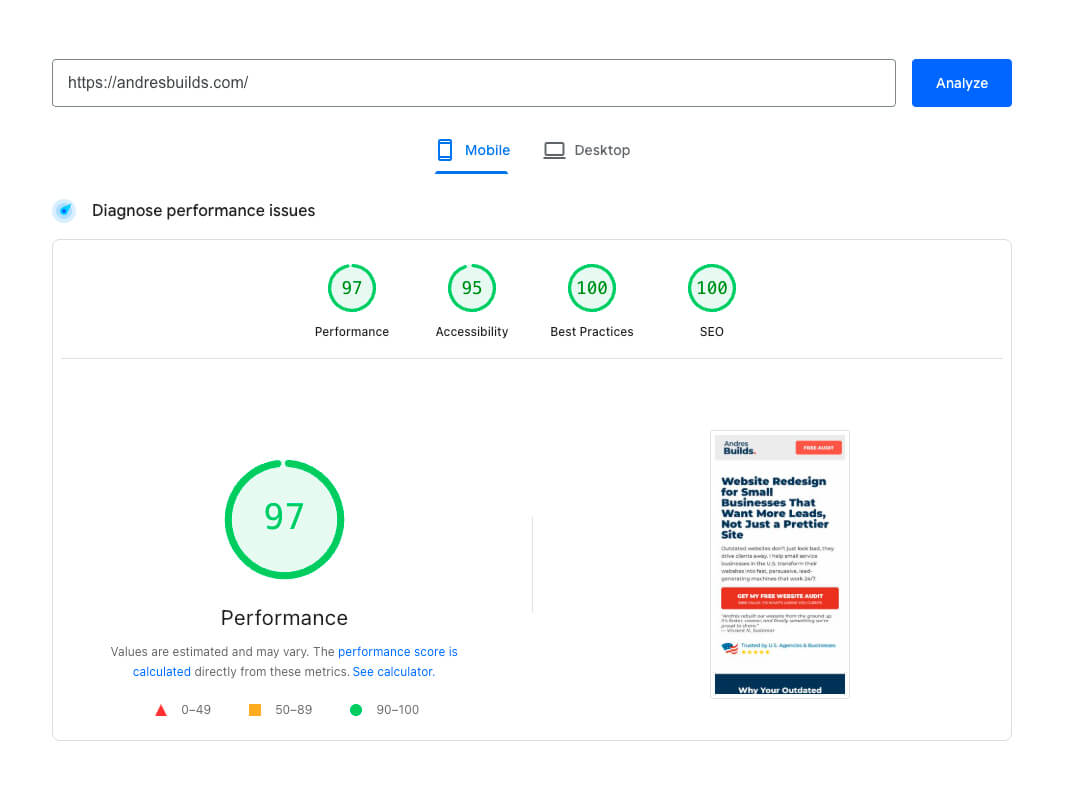
Keep your results handy so you can track improvement as you optimize.
Step 2: Optimize Your Images
Images are often the number one reason a page loads slowly. They can account for up to 70% of a page’s total weight.
How to Fix It:
- Convert all images to the WebP format to reduce size without losing quality.
- Use compression tools like TinyPNG or ShortPixel.
- Resize before uploading; don’t display a 4000px image at 1200px.
- Enable lazy loading so images load only when visible.
💡 Pro Tip: Keep total homepage image size under 1MB.
After optimizing image assets for a client in Miami, we reduced total file size by 65%. Their homepage load time dropped from 4.3 seconds to 1.8 seconds, and form submissions increased by 29% in just one month.
If you want a complete checklist for this process, check out our Ultimate Website Optimization Checklist.
Step 3: Use Browser Caching
Browser caching stores static files, like images and stylesheets, locally on your visitor’s device. When they return, the site loads almost instantly because it doesn’t have to download those files again.
How to Enable Caching:
- Use caching plugins like WP Rocket, LiteSpeed Cache, or W3 Total Cache if your site runs on WordPress.
- Configure cache expiry headers via your
.htaccessfile or hosting control panel. - Use Cloudflare’s CDN caching to serve assets faster to global visitors.
Cloudflare found that enabling caching can reduce repeat load times by more than 50%.
Step 4: Minify and Combine Files
Your website loads multiple CSS, JavaScript, and HTML files for every visitor. Each one adds extra time. Minifying removes unnecessary spaces and comments to make them smaller.
Action Steps:
- Install optimization plugins like Autoptimize or Fast Velocity Minify.
- Combine smaller CSS and JS files where possible to reduce HTTP requests.
- Test your site after combining to ensure there are no display errors.
This single step can cut load time by up to 1.5 seconds.
⚡ Want to know how much faster your site could get?
Request your Free Website Speed Review and see the exact load-time improvements possible.
Step 5: Use a Content Delivery Network (CDN)
A Content Delivery Network (CDN) distributes your website’s files across global servers. Visitors load your site from the server closest to them, which reduces latency and improves speed.
Top CDN Providers:
- Cloudflare (best free plan)
- Bunny.net (affordable and reliable)
- Akamai (enterprise-grade performance)
With a CDN, websites can load up to 60% faster worldwide.
For example, after implementing Cloudflare for a Los Angeles-based client, we reduced their time-to-first-byte by 43%, and their bounce rate fell by 22%.


Step 6: Upgrade to Faster Hosting
Even the best optimization can’t overcome poor hosting. Shared servers often slow down websites because multiple sites compete for the same resources.
What to Look For:
- SSD-based hosting instead of traditional HDD
- Managed WordPress hosting (such as WP Engine, Kinsta, or SiteGround)
- Servers located near your main audience
Switching to managed hosting can reduce load times by up to 50%.
💡 Tip: Ask your provider if they support PHP 8.2 and HTTP/3, which can make sites load up to 30% faster.
Step 7: Optimize for Mobile Devices
Over 58% of global web traffic comes from mobile (Statista, 2024). Mobile users expect speed and simplicity, not heavy pages or pop-ups.
Checklist for Mobile Optimization:
- Use a fully responsive WordPress theme.
- Avoid large popups or complex animations.
- Resize and compress images for mobile screens.
- Test with Google’s PageSpeed Insights.
Google research shows that 61% of users will not return to a site they found difficult to use, and 40% will visit a competitor instead.
Step 8: Maintain and Monitor Performance
Speed optimization is not a one-time task. Every time you add content or install a new plugin, performance can change.
Monitoring Tools to Use:
- Google Search Console for tracking Core Web Vitals
- GTmetrix History to monitor performance trends
- Cloudflare Analytics for global speed data
Run these tests monthly to maintain consistent speed.
Bonus Step: Track Real User Data
In addition to lab tests, monitor real user experiences with Google Search Console’s Core Web Vitals report. It tracks how actual visitors perceive your site speed and stability.
Focus on:
- LCP (speed)
- FID (interactivity)
- CLS (visual stability)
Websites that pass all three metrics see longer sessions, better retention, and stronger conversions.
Frequently Asked Questions
How fast should my website load to improve conversions?
Ideally under 2.5 seconds. Sites that load within two seconds have an average bounce rate below 10%.
What is the best free tool for testing website speed?
Google PageSpeed Insights gives accurate scores and step-by-step optimization suggestions.
Can I improve speed without hiring a developer?
Yes. Using plugins like WP Rocket, TinyPNG, and Cloudflare can fix most issues without coding.
Which cities do you serve?
We work with small businesses across the U.S., with a strong presence in New York, Los Angeles, Chicago, Miami, Atlanta, and Austin.
How soon will I see results after optimization?
You’ll often see measurable improvements within days and conversion increases within two to three weeks.
Conclusion
Website speed optimization is one of the fastest ways to boost your SEO rankings, improve conversions, and enhance user trust.
A one-second improvement in load time can increase conversions by as much as 27%. When we optimized a local service website in Chicago, reducing load time from 4.8 to 1.9 seconds, their form submissions increased by 36% within two weeks.
If your site feels slow or your visitors aren’t converting, it’s time to act.
Request your Free Website Speed Review today and discover exactly how to make your site load 2x faster.