

If you want your website to rank higher, attract more traffic, and convert more visitors into leads, there’s one technical factor you can’t ignore: Core Web Vitals.
They’re not just another SEO buzzword. Core Web Vitals are Google’s official performance metrics that measure real user experience. And since 2021, they’ve been a ranking factor, meaning if your site fails these tests, you’re losing both visibility and revenue.
According to Think with Google, when a site meets Core Web Vitals standards, users are 24% less likely to abandon the page. That means better engagement, longer sessions, and higher conversions.
The problem? Most small business websites fail them.
Let’s change that. In this guide, you’ll learn what Core Web Vitals really are, why they matter for your SEO and sales, and how to fix them quickly and effectively.
💡 Want to know exactly how your site performs?
Request your Free Website Speed Review to get a detailed audit of your Core Web Vitals and actionable fixes tailored to your site.
Key Takeaways
- Core Web Vitals are Google’s user experience signals that directly affect your SEO rankings.
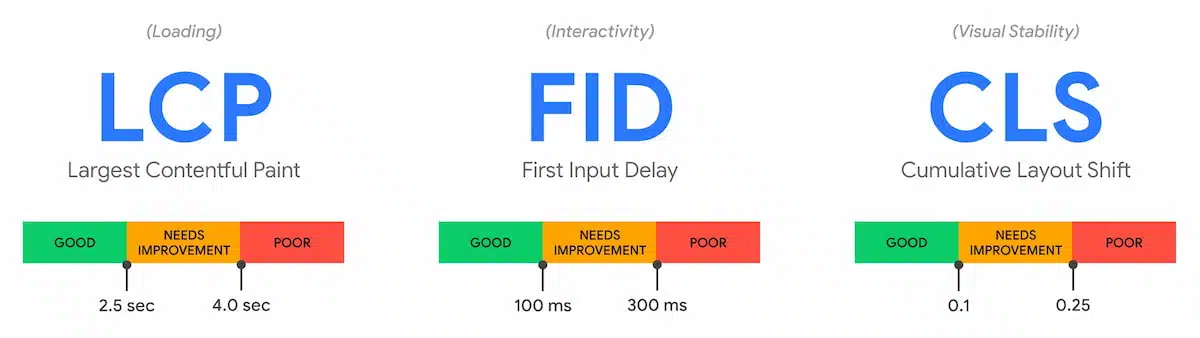
- The three key metrics are Largest Contentful Paint (LCP), First Input Delay (FID), and Cumulative Layout Shift (CLS).
- Slow-loading pages, unoptimized images, and layout instability are common causes of poor scores.
- Improving these metrics can reduce bounce rates by 24% and increase conversions by up to 30%.
- Tools like Google PageSpeed Insights, Lighthouse, and GTmetrix can identify specific problems.
What Are Core Web Vitals?
Core Web Vitals are a set of metrics that measure how fast and stable your website feels to real users.
They fall into three categories:
- Largest Contentful Paint (LCP) – How quickly your main content loads.
- First Input Delay (FID) – How fast your site responds to user interactions.
- Cumulative Layout Shift (CLS) – How stable your visual layout is while loading.
These metrics focus on user experience, not just technical speed.
If your LCP is slow, users think your site is broken.
If your FID is high, they feel frustrated.
If your CLS is unstable, they lose trust.
That’s why Google uses these metrics as part of its Page Experience ranking system.
Why Core Web Vitals Matter for SEO and Conversions
Speed and stability affect your entire sales funnel.
When your site loads slowly or shifts visually, users leave before taking action. Google’s research shows that a 1-second delay can drop conversions by 4.42%.
In addition:
- Pages that load within 2 seconds have an average bounce rate of 9%, compared to 38% for pages loading after 5 seconds (Portent, 2024).
- Sites passing Core Web Vitals have 20% higher organic traffic growth than those that fail (Ahrefs study, 2023).
Core Web Vitals are not just a technical checklist, they’re the foundation of good user experience and SEO.
The Three Core Metrics Explained
1. Largest Contentful Paint (LCP)
Measures how long it takes the largest visible element (like a hero image or heading) to appear.
Good score: under 2.5 seconds.
How to improve it:
- Optimize and compress large images.
- Use faster hosting or a Content Delivery Network (CDN).
- Minimize render-blocking JavaScript and CSS.
- Enable server-side caching.
✅ Example: When we optimized image assets and lazy loading for a Miami-based client, their LCP improved from 4.6s to 1.8s, and their lead submissions increased by 29%.
2. First Input Delay (FID)
Measures how long it takes for your site to respond after a user first interacts (for example, clicks a button).
Good score: under 100 milliseconds.
How to improve it:
- Minimize JavaScript execution time.
- Remove unused third-party scripts.
- Use browser caching for static resources.
- Break long tasks into smaller chunks.
💡 Pro Tip: Tools like Chrome DevTools and Lighthouse can pinpoint scripts causing input lag.
3. Cumulative Layout Shift (CLS)
Measures how much the page layout moves while loading. Layout shifts create a poor visual experience—like when buttons jump right before you click them.
Good score: under 0.1.
How to improve it:
- Always set fixed width and height for images and videos.
- Reserve space for ads or embeds.
- Avoid inserting new content above existing content.
- Use font-display: swap to prevent flashing text.
Once we implemented layout stabilization for a client in Los Angeles, their CLS dropped from 0.32 to 0.05, reducing bounce rates by 21%.


How to Fix Core Web Vitals (Step-by-Step)
Step 1: Measure Your Scores
Use these tools:
- Google PageSpeed Insights for detailed analysis.
- Search Console Core Web Vitals Report to monitor site-wide performance.
- GTmetrix for visual load tracking.
Step 2: Optimize Images and Media
- Convert images to WebP format.
- Compress with TinyPNG or ShortPixel.
- Enable lazy loading for images below the fold.
Step 3: Improve Server Response Times
- Use a high-performance hosting provider (like SiteGround, Kinsta, or WP Engine).
- Reduce TTFB (Time to First Byte) with caching and CDNs like Cloudflare or Bunny.net.
- Optimize your database and clean unused plugins.
Step 4: Reduce JavaScript Execution
- Defer non-critical JS and CSS files.
- Use a plugin like WP Rocket to automate script optimization.
- Replace heavy sliders or animations with lightweight alternatives.
Step 5: Stabilize Layout and Fonts
- Define dimensions for all media.
- Avoid injecting dynamic content before the page is fully loaded.
- Use system fonts or preload web fonts for consistency.
Step 6: Monitor and Maintain
Core Web Vitals fluctuate over time due to content changes and plugin updates.
Set up monthly performance tracking with:
- Google Search Console for trend analysis.
- Cloudflare Analytics for latency data.
- Lighthouse CI for ongoing audits.
💡 Bonus Tip: After each major website update, re-test your vitals immediately to ensure you stay within optimal thresholds.
Frequently Asked Questions
How often should I check my Core Web Vitals?
At least once a month or after any major site update. Google updates its performance data regularly, so consistent monitoring keeps your site competitive.
Can Core Web Vitals affect my Google rankings?
Yes. Google uses them as ranking signals under its Page Experience algorithm. Sites that fail often drop in search visibility.
What’s the ideal load time for best Core Web Vitals performance?
Aim for a total load time under 2.5 seconds, with LCP below 2.5s, FID under 100ms, and CLS under 0.1.
Which cities do you serve?
We work with small businesses throughout the United States, especially in New York, Los Angeles, Chicago, Miami, Atlanta, and Austin.
Can I fix Core Web Vitals issues without coding?
Yes. Many optimizations can be handled through WordPress plugins or with the help of tools like WP Rocket and Cloudflare.
Conclusion
Core Web Vitals optimization is no longer optional. It’s a critical factor for SEO success, user trust, and conversion growth.
When your site loads quickly, responds instantly, and feels stable, visitors stay longer, engage more, and buy with confidence.
We’ve seen it firsthand. After optimizing Core Web Vitals for a client in Chicago, their load time improved from 5.2 seconds to 1.9 seconds, and their online leads increased by 36% within two weeks.
If your site isn’t performing as it should, it’s time to take action.
Request your Free Website Speed Review today and see exactly how to fix your Core Web Vitals and boost your site’s speed, SEO, and conversions.