
If your website is getting traffic but not leads, the problem isn’t your marketing; it’s your conversion rate.
Most small business sites fail to convert visitors because of unclear messaging, slow load times, poor mobile experience, or missing trust signals.
But here’s the good news:
You don’t need to rebuild your entire site to turn things around.
In this guide, I’ll show you 7 fast, proven ways to improve your website conversion rate without hiring a full team or burning your budget.
These are the same tactics we’ve used to help businesses like NotaSmart triple their demo requests and Sudamar boost form submissions in under 30 days.
And if you want a professional audit tailored to your site, you can request a free $800 website conversion audit here.
Let’s get started.
Key Takeaways
- Most websites can increase conversions with small design and copy changes
- Speed, clarity, and trust are more important than fancy animations or effects
- Pages with a single, clear CTA convert 1.6x better than those with multiple CTAs
- Even one testimonial or success metric can boost trust instantly
- Tools like Hotjar, GTmetrix, and Google Analytics are your best allies
- If your website isn’t converting, you don’t need more traffic; you need better UX
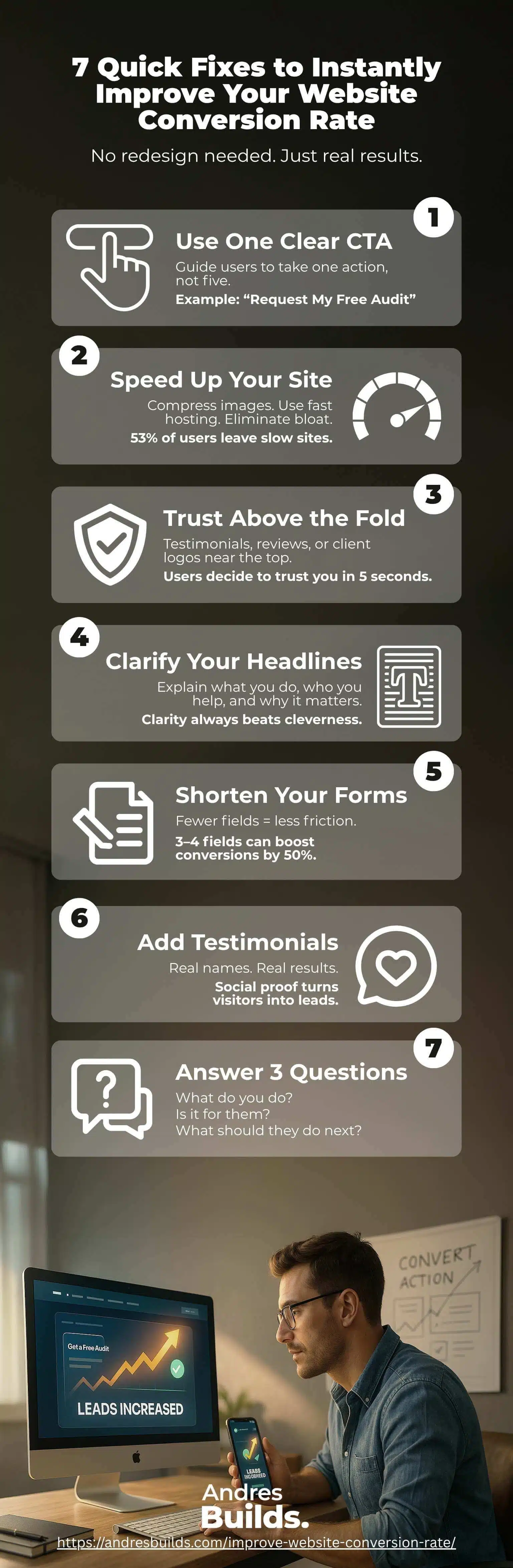
1. Use a Clear CTA to Improve Website Conversion Rate
Your website should guide the visitor to one action, not five.
According to Unbounce, pages with a single CTA increase conversions by 16%.
Replace vague buttons like:
- Learn More
- Contact Us
- See Services
With clear, conversion-focused CTAs like:
👉 Get Your Free Audit
👉 Book Your Discovery Call
👉 Request a Custom Quote
Repeat this CTA in at least two places on the page, and make the button color stand out visually.
2. Improve Website Speed to Boost Conversions
Speed kills… or converts.
A Portent study shows that every second of delay in load time reduces conversions by 4.42%.
Use these tools to test your website:
Quick wins:
- Compress and serve images as WebP
- Eliminate unused scripts and plugins
- Use a CDN like Cloudflare
- Choose performance-optimized hosting
We helped Sudamar improve mobile speed by over 40%, and leads followed immediately.
3. Add Visual Trust Signals Above the Fold
Visitors need to trust you before they scroll or click.
Displaying even one trust element above the fold can significantly boost engagement:
✅ Google or Facebook review badges
✅ Testimonials with photos or logos
✅ “Trusted by” brand logos
✅ Secure checkout icons for eCommerce
✅ Real team photos (not stock)
The NotaSmart redesign added three small trust badges and a client testimonial to the homepage, resulting in a 3X lift in demo requests.
4. Optimize Headlines to Match User Intent
Your main headline is where conversion begins.
Instead of vague statements like:
“We Build Beautiful Websites”
Say:
“Websites That Convert Visitors Into Clients. Built for Small Businesses”
Clarity converts better than creativity.
Use CoSchedule’s Headline Analyzer to test and optimize headlines for emotion, length, and clarity.
Not sure if your site even needs a redesign? Start by reading these 5 signs your website might be outdated or costing you leads.
5. Shorten Forms to Increase Conversions
Long forms create friction.
HubSpot research found that reducing form fields from 7 to 3 can boost conversion rates by up to 50%.
Ideal form fields:
- First name
- One question or dropdown (e.g., “What do you need help with?”)
Use tools like Calendly for one-click booking or embed short forms above the fold.
6. Add Real Testimonials to Build Instant Trust
Social proof works; even one good testimonial can shift a visitor’s mindset.
To maximize impact:
- Use real names and photos
- Highlight specific results
- Match the testimonial to your ideal customer
Example:
“After working with Andrés, our leads tripled in 3 weeks. The audit showed us exactly what we were doing wrong.”
— Diana, Marketing Director
If you don’t have many yet, start with one or two strong client quotes. We can help you format and display them strategically in your free audit.

7. Make Your Homepage Answer These 3 Questions in 5 Seconds
The average visitor spends just 2.6 seconds scanning your homepage before deciding what to do next.
Make sure your site answers:
- What do you offer?
- Who is it for?
- What should I do next?
If these aren’t clear in your hero section, users will bounce.
Use this simple layout:
- Headline: What you do
- Subheadline: Who you help + benefit
- Button: CTA with action (e.g., Get Started, Book a Demo)
Test it with someone who’s never seen your site. Can they describe your business after 5 seconds? If not, it’s time to optimize.
Frequently Asked Questions
What’s the best way to improve website conversion rate?
Start by fixing your messaging, call-to-actions, page speed, and trust elements. You can see big results without redesigning everything. We recommend beginning with a conversion-focused audit to identify low-hanging opportunities.
What is a good conversion rate for a small business website?
A solid conversion rate for small service-based businesses is 3% to 5%. Many of our clients start below 1% and double that with just a few key improvements.
How do I know if my site has a conversion problem?
If you’re getting traffic (from SEO, Google Ads, or referrals) but not getting calls, form submissions, or bookings, you likely have a conversion issue. Tools like Hotjar and Google Analytics can show you where visitors drop off.
Do these fixes apply to WordPress sites?
Yes, all these improvements are easy to implement on WordPress, especially with builders like Elementor or GeneratePress. Need help? We’ll show you exactly where to apply them during your audit.
Which cities do you serve?
We work with businesses across the U.S., with most of our clients located in:
Austin, TX – Tampa, FL – Charlotte, NC – San Diego, CA – Phoenix, AZ – Atlanta, GA
If you’re in any of these areas, you’ll benefit from our local market insights and proven frameworks.
Final Thoughts: Your Site Should Sell, Not Confuse
Your website should be your best salesperson, not your quietest employee.
If you’re not getting the leads you want, it’s likely due to one (or several) of the issues above. But the fix doesn’t have to be expensive or complicated.
Small, smart changes can create major growth.
💡 Want to know exactly what’s hurting your conversions?
👉 Request your free website audit here
We’ll give you a personalized report with:
- Speed and mobile tests
- Conversion blockers
- 3 actionable fixes you can implement today
No fluff. No hard sell. Just results.