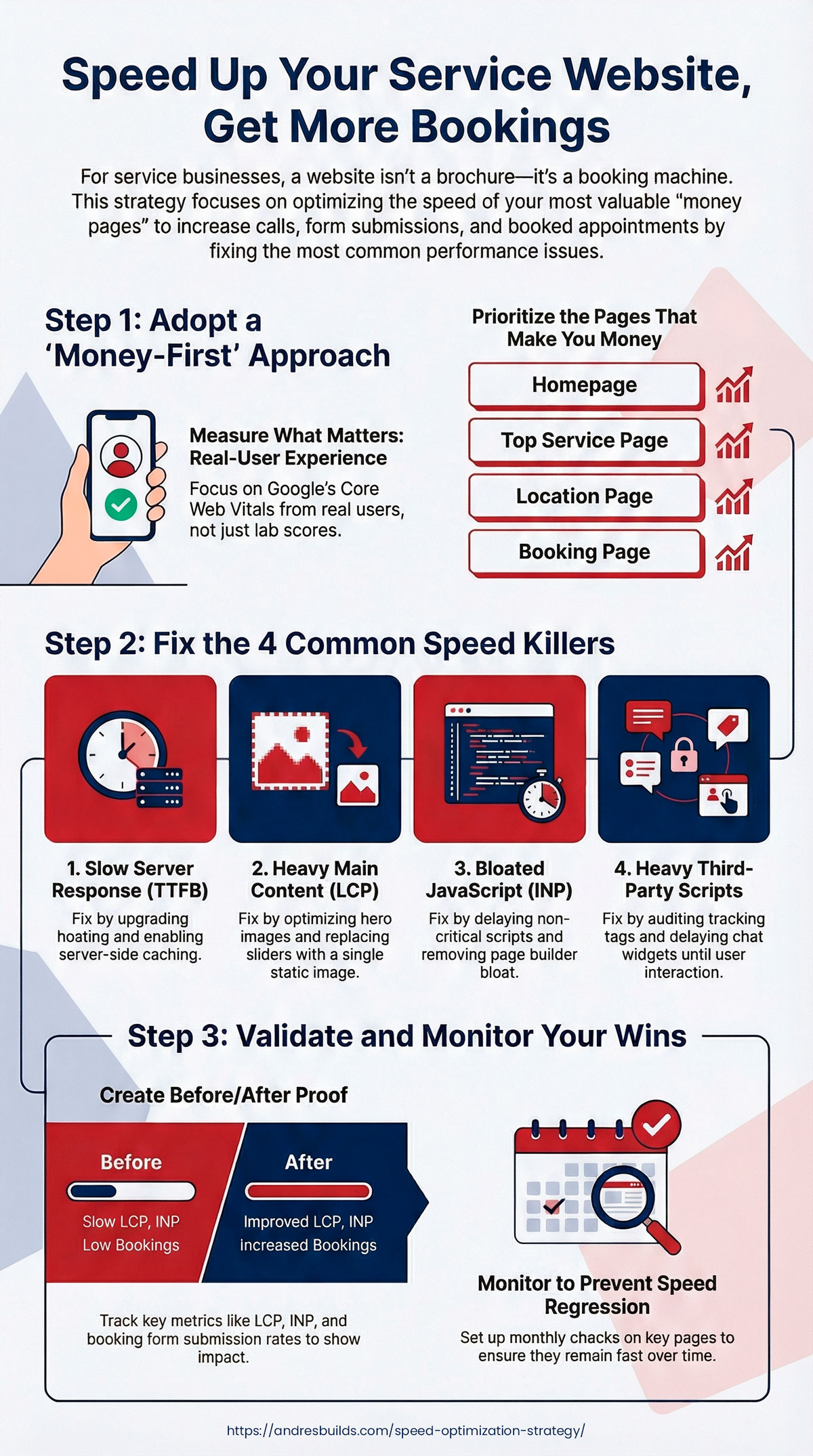

If you run a service business, your website is not a “brand brochure.” It’s a booking machine. That’s why having a clear speed optimization strategy is no longer optional—it’s the difference between getting the call or losing the lead to a faster competitor.
A speed optimization strategy is a structured approach to improving load time, interactivity, and visual stability on the pages that actually generate revenue: service pages, location pages, and booking flows.
This guide gives you a proven, repeatable speed optimization strategy built specifically for service businesses that rely on leads, calls, and bookings.
Quick Summary (Read This First)
- This speed optimization strategy focuses on money pages first, not vanity metrics.
- Faster load times directly increase calls, form submissions, and booked appointments.
- The biggest wins usually come from fixing TTFB, LCP, JavaScript execution (INP), and third-party scripts.
- Service businesses must optimize for mobile, real-user data, not just lab scores.
Listen: Speed Optimization Strategy for Service Businesses (Proven Framework) (Full Episode)
Key Takeaways
- Service businesses should optimize speed around money pages: homepage, service pages, location pages, booking pages.
- Google evaluates performance using real-user experience metrics (Core Web Vitals), not just lab scores.
- The fastest wins usually come from fixing TTFB, the LCP element, JavaScript execution, and third-party scripts.
- Speed improvements compound with CRO improvements: faster pages typically generate more leads.
- You need a framework that includes measurement, prioritization, implementation, and monitoring.
Why Speed Hits Service Businesses Harder Than E-commerce
Service businesses have a unique conversion pattern:
- Visitors are often on mobile
- They want a quick answer (price range, availability, proof)
- They convert through a booking form, phone call, or “Request Quote” CTA
That means your “slow page penalty” is brutal: if the site delays the first meaningful content or the booking widget, people bounce and call the next competitor.
If you want the bigger picture of why speed drives results, read: Why Website Speed Matters and Improve Website Conversion Rate
The Proven Speed Optimization Strategy
This framework is designed to help you move fast, avoid busywork, and focus on changes that impact leads.
Step 1: Measure Speed the Way Google Does

Don’t chase a single “score.” Measure what users actually experience.
Use:
- PageSpeed Insights for field + lab data
- Google Search Console Core Web Vitals for site-wide field data
- WebPageTest for waterfalls and LCP element diagnosis
- GTmetrix for visual load filmstrip and heavy assets
Start here: Top Free Tools to Test Website Speed and Google PageSpeed Insights Impact
Step 2: Pick the Pages That Make You Money
Quick CRO note: If you want a prioritized speed optimization strategy tailored to your service business, you can request a free Website Speed & Conversion Audit and see exactly which pages and fixes will produce the fastest ROI.
Service businesses don’t need to optimize every page first. Optimize in this order:
- Homepage (first impression + trust)
- Top service page (best lead driver)
- Location page (local SEO + high intent)
- Booking / contact page (conversion)
- Top blog post (organic entry point)
This is how you get ROI fast.
If you want to improve your homepage lead flow too: Homepage Optimization Tips to Double Your Leads
Step 3: Fix the 4 Root Causes That Usually Kill Speed
In almost every service business site, slowdowns come from the same four problems.
1) Slow Server Response Time (TTFB)
If TTFB is high, your site is slow before it even starts.
Fixes:
- Upgrade hosting (CPU/RAM, PHP 8.2+, modern stack)
- Enable server-side caching (properly)
- Reduce database overhead
2) A Heavy LCP Element
Your LCP is usually:
- A hero image
- A slider
- A background video
Fixes:
- Replace sliders with a single optimized hero
- Serve modern formats (WebP/AVIF)
- Preload the hero image
3) JavaScript Execution and INP
Modern sites are often “fast-looking” but slow to interact.
Fixes:
- Delay non-critical scripts
- Remove unused scripts
- Reduce page builder bloat
4) Third-Party Scripts
Tracking tools can destroy responsiveness.
Fixes:
- Audit GTM tags
- Delay chat widgets until interaction
- Replace heavy embeds (YouTube, maps) with lightweight click-to-load
For a deeper performance playbook and concrete benchmarks, read: Website Performance Techniques That Actually Work
Step 4: Apply the “Booking-First” Optimization Rule

Service businesses win when the booking experience is fast.
Your goal:
- The visitor sees trust elements quickly
- The CTA is visible immediately
- The booking form loads fast and stays stable
Checklist:
- Put the primary CTA above the fold
- Avoid rendering delays around the booking widget
- Reduce layout shifts (CLS) around form fields
- Ensure tap targets are easy on mobile
If you’re unsure what’s hurting bookings, run a structured audit: How to Run a Website Speed Audit (Step-by-Step With Tools)
Step 5: Use a Real Optimization Stack (Not Random Plugins)
If you’re on WordPress, your “stack” matters.
A strong service-business stack includes:
- Lightweight theme (or block theme)
- Clean page structure (avoid nested containers)
- Image optimization + CDN where needed
- Script control (delay/defer/disable by page)
If your site is WordPress and still slow even after caching: WordPress Speed Optimization Guide and Advanced WordPress Optimization: Beyond Cache Plugins
Step 6: Validate Wins With Before/After Proof
What This Strategy Delivers
- Faster booking page load on mobile
- Lower bounce rates on service pages
- Better Core Web Vitals stability over time
- Higher form completion and call intent
- Clear before/after proof you can track and report
A real speed optimization strategy includes evidence.
Create a simple “before vs after” log:
- Mobile PSI field data status
- LCP, INP, CLS (field data)
- TTFB and LCP element (lab)
- Booking form load + submission rate (GA4 events)
This makes optimization measurable, repeatable, and easier to sell internally.
Step 7: Monitor So Speed Doesn’t Regress

Performance decays over time as plugins update, scripts get added, and content grows.
Set up monitoring:
- Track mobile LCP under ~2.5s as a baseline
- Aim for INP below ~200ms on key pages
- Flag TTFB above ~400ms as a hosting issue
- Search Console Core Web Vitals report
- Monthly PageSpeed Insights check on top money pages
- Uptime + performance monitoring (basic)
If you want a checklist-driven approach: Website Speed Optimization Checklist


Common Mistakes That Waste Time
- Optimizing desktop while mobile is failing
- Chasing a 100 score instead of improving real-user metrics
- Keeping sliders and background videos on the homepage
- Letting third-party scripts pile up forever
- Testing one page and assuming the whole site is fixed
FAQs About Speed Optimization Strategy
What is the best speed optimization strategy for service businesses?
A strategy that prioritizes money pages first, improves TTFB and LCP, reduces JavaScript execution for better INP, and validates results with before/after tracking.
What page should I optimize first?
Your homepage or your top service page. Pick the page that generates the most calls or booking requests.
What’s a good target load time?
For service businesses, aim for fast visual load and stable interactivity on mobile. Hitting “Good” Core Web Vitals is a strong baseline.
Do I need a CDN?
If you have heavy images, a wide service area, or traffic from multiple regions, a CDN often helps. If your traffic is purely local and your host is strong, it may be optional.
Want a Speed Optimization Strategy Built for Your Business?
If your website should be generating calls and bookings, speed is not optional.
My flagship offer is Speed & Booking Fix. I’ll run a free Website Speed & Conversion Audit (worth $800) and show you exactly what’s slowing down your money pages and what to fix first.
You’ll get:
- A prioritized list of fixes (fast wins first)
- Core Web Vitals and real-user insights
- Booking funnel speed review
- A simple before/after plan to prove results
Request your free audit and let’s turn speed into booked appointments.