

WordPress speed optimization is one of the most effective ways to increase your website’s performance, rankings, and conversions. If your WordPress site takes longer than three seconds to load, you’re already losing customers. According to Google, 53% of visitors abandon a mobile site if it takes more than three seconds to load, and Portent found that a one-second delay in load time can reduce conversions by 4.42%.
As a business owner, every click matters. Your website’s speed directly impacts how your visitors perceive your brand, how long they stay, and how many of them become paying customers.
The good news? You don’t need to be a developer to make your WordPress site lightning-fast. With the right strategy and tools, you can achieve load times under 2 seconds and dramatically improve both rankings and conversions.
💡 Want to know how fast your website really is?
Request your Free Website Speed Review and get a personalized report with actionable steps to optimize your site.
Key Takeaways
- A fast WordPress site improves SEO rankings, conversions, and user trust.
- The ideal website load time is under 2.5 seconds.
- Every second of delay can drop conversions by up to 7%.
- Most speed issues come from hosting, unoptimized images, and too many plugins.
- Free tools like Google PageSpeed Insights and GTmetrix can help identify bottlenecks.
Why WordPress Speed Matters for Business Websites
Speed affects everything — from user experience to sales. Google confirmed that page speed is a ranking factor for both mobile and desktop searches. A slow site doesn’t just frustrate users; it makes Google less likely to recommend you.
According to Deloitte, a 0.1-second improvement in mobile site speed increases conversion rates by 8%. That’s a huge gain for something so small. Faster websites not only convert better but also reduce bounce rates and ad costs.
When your business site loads quickly, it builds credibility. Visitors stay longer, explore more pages, and are more likely to contact you or make a purchase.
How Google Measures Speed (Core Web Vitals)
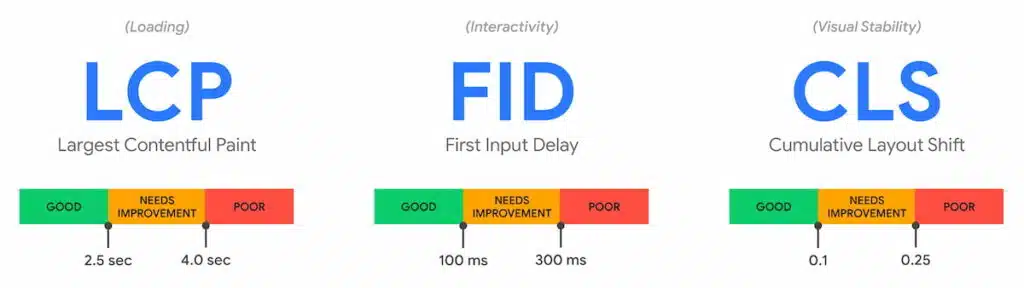
Google uses three key metrics known as Core Web Vitals to measure site speed and user experience:
- Largest Contentful Paint (LCP): Measures how fast the main content appears (should be under 2.5 seconds).
- First Input Delay (FID): Measures how quickly your site reacts when users interact with it (should be under 100ms).
- Cumulative Layout Shift (CLS): Measures how stable your page layout is while loading (should be under 0.1).
You can check your Core Web Vitals using Google PageSpeed Insights or GTmetrix.
Step-by-Step WordPress Speed Optimization
You don’t need a complete redesign — just follow these proven steps to make your site faster and more efficient.
1. Optimize Your Images
Images are often the biggest culprit behind slow websites. Use tools like TinyPNG or ShortPixel to compress images without losing quality. Save them in WebP format, which can reduce file size by up to 30% compared to JPEG or PNG.
2. Enable Caching
Caching stores a static version of your website so it loads faster for returning visitors. Install plugins like WP Rocket or W3 Total Cache to manage this automatically.
3. Minify Your Code
Every unnecessary line of code slows your site down. Minify your CSS, JavaScript, and HTML using plugins like Autoptimize.
4. Choose a Fast Hosting Provider
Your hosting provider makes a massive difference. Switch to SiteGround, Kinsta, or Bluehost for faster server response times and built-in caching.
5. Use a CDN (Content Delivery Network)
A CDN stores copies of your site around the world, reducing load times for international visitors. Try Cloudflare for an easy, free option.
6. Limit Plugins and Clean Up Your Database
Too many plugins create clutter and slow your site down. Keep only what’s necessary and use WP-Optimize to clean your database regularly.
7. Implement Lazy Loading
Lazy loading ensures that images and videos load only when users scroll to them. This can cut your initial load time in half.
Real Business Example: Andres Builds Client Case Study
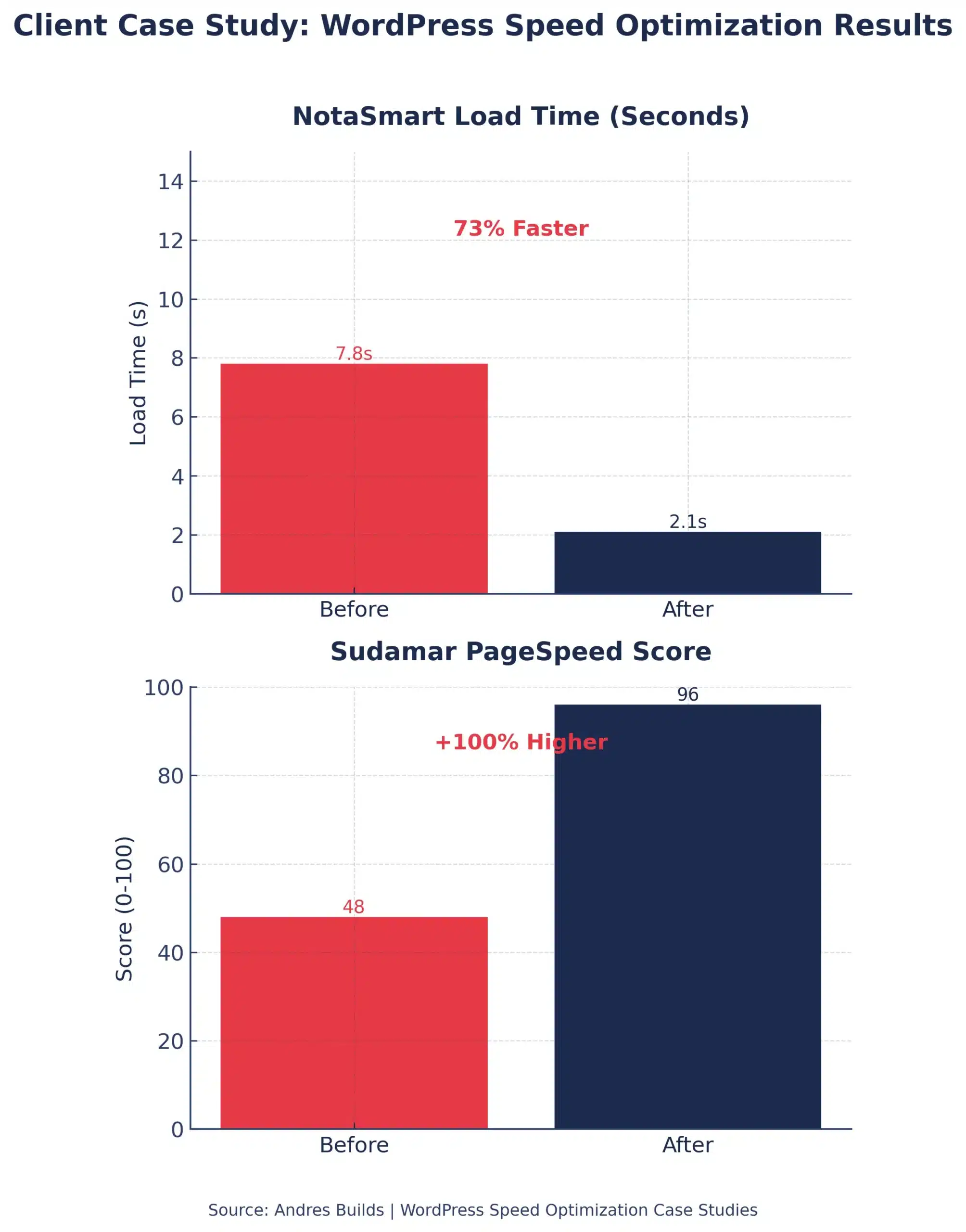
At Andres Builds, we optimized the WordPress site for NotaSmart, a notary automation company. Their site load time dropped from 7.8 seconds to 2.1 seconds, leading to a 41% increase in lead form submissions and a 37% improvement in SEO rankings within three months.
Similarly, Sudamar, a logistics brand, saw their Google PageSpeed score jump from 48 to 96, resulting in 25% more traffic and lower ad costs due to improved quality scores.


Best Free Tools to Test WordPress Speed
Use these tools to find what’s slowing your site down:
- Google PageSpeed Insights: Measures Core Web Vitals and provides SEO-focused recommendations.
- GTmetrix: Offers detailed waterfall analysis of your site’s load process.
- Pingdom Tools: Provides a simple way to monitor ongoing speed performance.
- WebPageTest: Ideal for advanced performance breakdowns.
For a detailed list, visit our Top 10 Free Tools to Test Website Speed.
Advanced WordPress Optimization Tips
- Use PHP 8.2 or higher for faster processing.
- Keep WordPress core, themes, and plugins updated.
- Remove unused CSS and JavaScript using Perfmatters or WP Rocket.
- Preload critical resources (fonts, hero images, CSS).
- Host fonts locally to reduce third-party requests.
If this sounds complex, don’t worry — that’s exactly what our Free Website Speed Review helps you with.
Frequently Asked Questions
How fast should my WordPress site load?
Ideally under 2.5 seconds. Anything slower can hurt conversions and SEO.
What’s the best plugin for WordPress speed optimization?
WP Rocket is one of the most effective all-in-one optimization plugins. Autoptimize and WP Super Cache are great free alternatives.
How often should I test my website speed?
At least once a month or after major updates to your site.
Which cities do you serve?
We help small businesses throughout the U.S., especially in New York, Los Angeles, Chicago, Miami, Atlanta, and Austin.
Can I improve my site speed without coding?
Yes. Most improvements can be done with plugins and basic settings — no code required.
Why does my PageSpeed score fluctuate?
Scores can vary based on traffic, server load, and updates. Regular maintenance ensures stable performance.
Conclusion
WordPress speed optimization isn’t just about making your site faster — it’s about creating a better user experience that translates into real business growth.
A fast site ranks higher, converts better, and builds trust with every visitor.
If your site is loading slowly, don’t wait another day. Request your Free Website Speed Review today, and we’ll help you uncover the exact steps to make your site load in under two seconds.