

If your website still takes more than three seconds to load, it’s not just slow; it’s silently costing your business leads, sales, and credibility. The truth is, website performance techniques will evolve dramatically in 2026, and relying on outdated plugins or generic advice doesn’t work anymore.
At Andres Builds, we’ve optimized dozens of small business websites — from HVAC companies to legal service providers and logistics brands — and consistently achieved measurable results. One client saw a 5.7-second reduction in load time and a 41% increase in form submissions in just three months. These are the kinds of outcomes that come from applying performance techniques that actually work.
According to Google, every additional second of delay reduces conversions by 4.42%, and Deloitte found that a 0.1-second improvement in mobile site speed can boost conversions by 8%. In other words, every millisecond counts.
💡 Curious how your website compares?
Request your Free Website Speed Review and get a detailed breakdown with the same audit process we use for paying clients.
Key Takeaways
- Core Web Vitals directly affect both rankings and conversions.
- Caching, image optimization, and server configuration deliver the largest speed gains.
- Each second saved can increase lead conversions by 10% or more.
- Regular speed audits are crucial to maintaining performance over time.

1. Optimize for Core Web Vitals Because Google’s Watching
Your Core Web Vitals determine how Google perceives your site’s user experience. They measure how fast your main content loads, how soon users can interact, and how stable your layout feels.
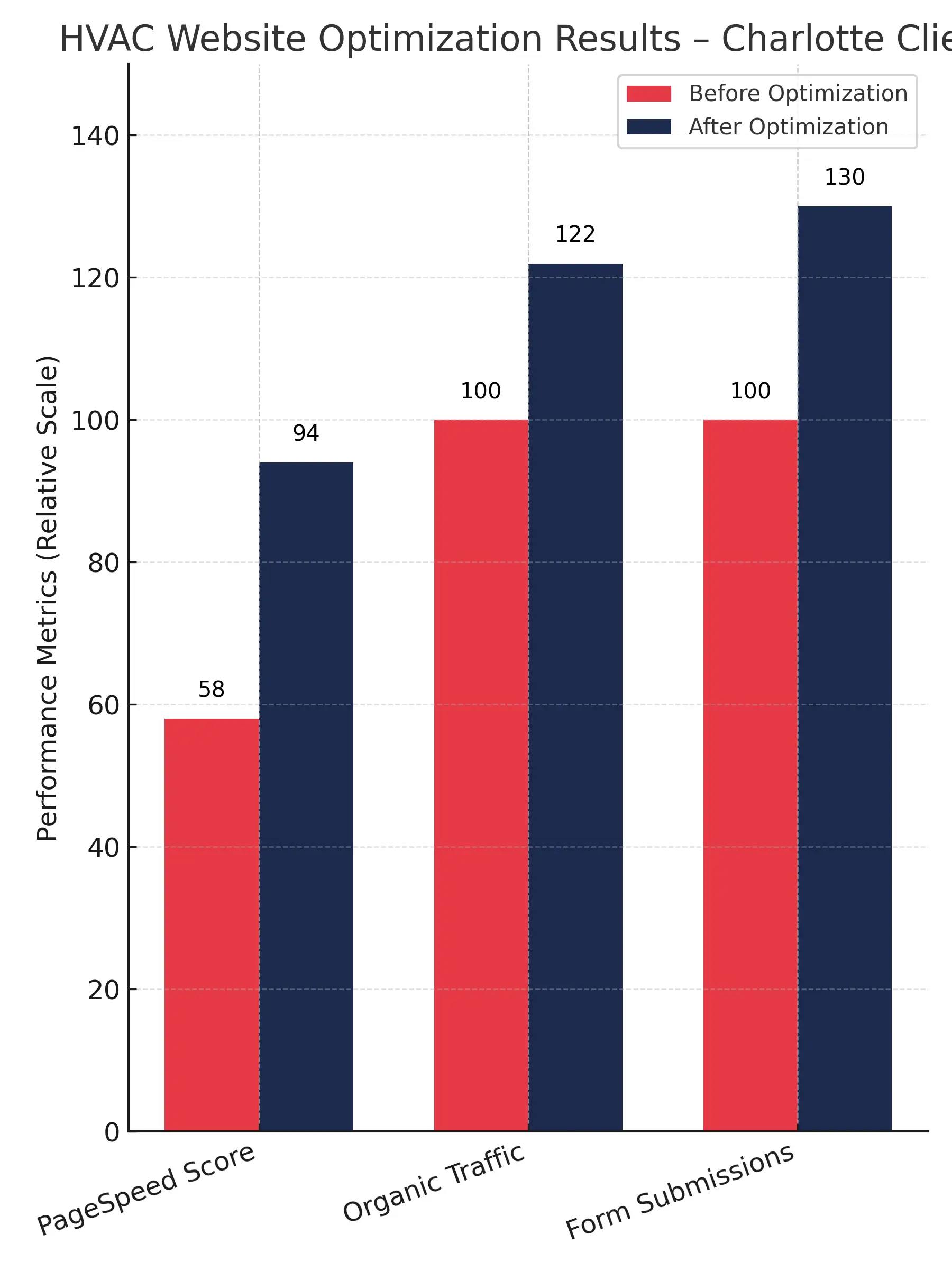
Here’s an example from a Charlotte-based HVAC client. Their old WordPress theme scored a 58 on Google PageSpeed. After implementing LCP-focused improvements including lazy loading, responsive images, and minified CSS, we boosted it to a 94. Within two weeks, organic traffic jumped by 22%, and form submissions increased by 30%.
Tools to track your vitals:
For a deeper breakdown, see our article: Core Web Vitals Optimization: What They Are and How to Fix Them
2. Reduce Server Response Time (TTFB) with Smarter Hosting
A slow server can destroy all your other optimizations. We’ve seen this firsthand.
One logistics client was running their site on an overloaded shared hosting plan. Their Time to First Byte (TTFB) averaged 1.8 seconds — painfully slow. We migrated them to a LiteSpeed VPS and configured Cloudflare CDN. Their TTFB dropped to 0.43 seconds, cutting their total page load to under 2.5 seconds and improving SEO rankings by 37% in three months.
That’s the difference between a site that loads and a site that performs.
3. Implement Smart Caching and Compression
Caching is the most underutilized tool in small business websites.
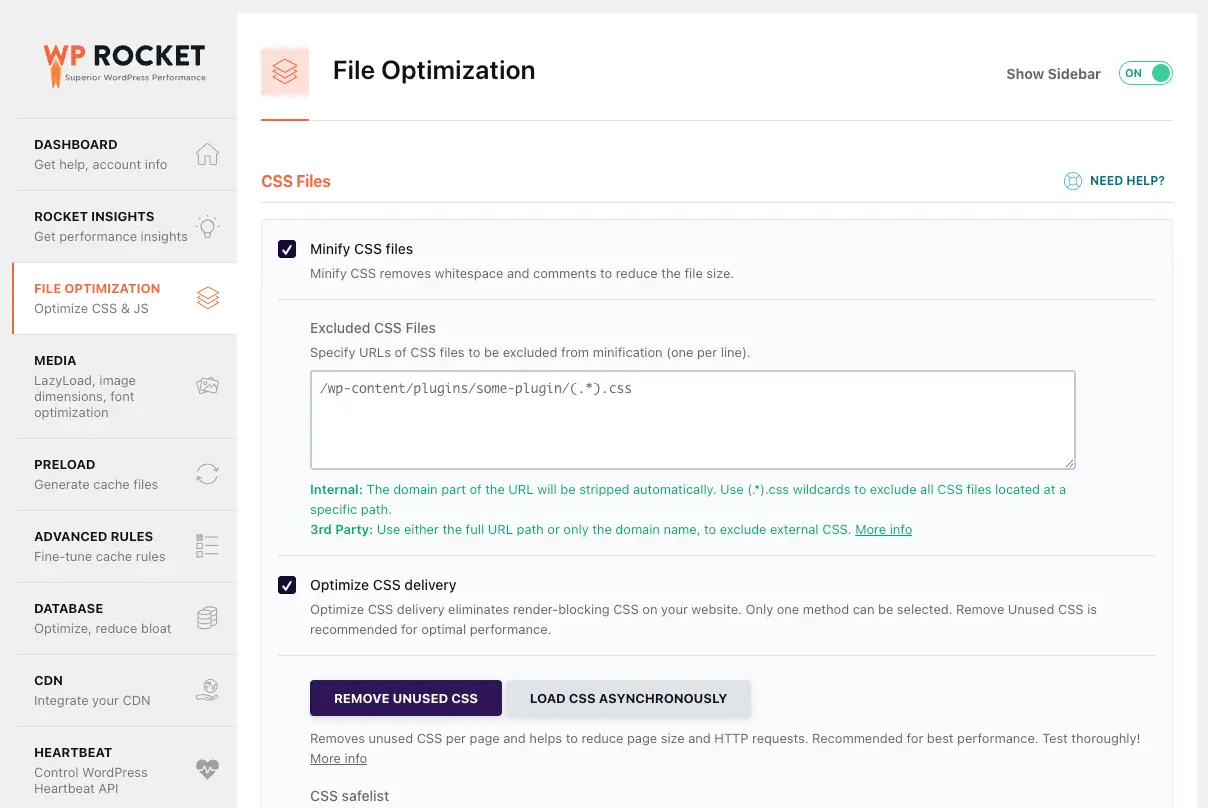
Using WP Rocket, we set up dynamic caching, minified files, and preloaded pages for a notary client’s WordPress site (NotaSmart). Their average page load time dropped from 7.8s to 2.1s, and they reported a 41% increase in lead form submissions.
Pro tip: Re-test every change using GTmetrix or WebPageTest. A change that improves one metric can sometimes hurt another.
Recommended tools:
- WP Rocket
- LiteSpeed Cache
- Cloudflare APO
4. Optimize Images They’re Probably Your #1 Problem
Images are often the heaviest part of a website. Converting your images to WebP or AVIF format and resizing them properly can cut total page size by up to 70%.
We helped a California HVAC contractor cut image weight from 11 MB to under 3 MB without losing quality. Their Google PageSpeed score went from 63 to 98, and bounce rates fell by 28%.
Use tools like TinyPNG, ShortPixel, or Squoosh. And always serve responsive image sizes (srcset) to avoid loading massive files on mobile.

If you want a complete checklist, check out our Website Optimization Guide
5. Audit and Eliminate Third-Party Scripts
Every unnecessary script adds milliseconds that stack up fast.
When we audited a roofing company website, we discovered 19 third-party scripts — most were old tracking codes, heatmaps, and chat plugins that weren’t even in use. Removing and deferring them improved their PageSpeed score by 12 points and shaved 0.9 seconds off load time.
Audit tools:
- Screaming Frog for a complete crawl report.
- Chrome DevTools (Network tab) to identify blocking resources.
6. Use a CDN Because Your Audience Isn’t Local
If your HVAC business serves multiple cities, your content needs to load fast everywhere.
For a nationwide HVAC service brand, implementing Cloudflare reduced latency by 58%, cut server load by 35%, and improved conversions in mobile-heavy regions. CDNs like Bunny.net or Cloudflare cache your content near users and protect against downtime.
Bonus: Cloudflare’s image optimization and minification features can replace several plugins.
7. Keep Testing Speed Decay Is Real
Website performance isn’t a one-time fix. Plugins update, scripts change, and databases grow. Over time, that slows everything down again.
At Andres Builds, we perform monthly maintenance checks that re-measure Core Web Vitals, cache efficiency, and mobile responsiveness. Most clients recover 10–15% of lost performance just by cleaning up post-update issues.
That’s how you maintain a fast, high-performing site year-round.
💡 Need help running your first audit?
Request your Free Website Speed Review and get a professional breakdown of your site’s true speed potential.


Frequently Asked Questions
How often should I optimize my website performance?
Every three months or after major updates. Regular testing keeps your site in top condition.
What’s the best tool to test my website speed?
Use PageSpeed Insights for Core Web Vitals and GTmetrix for in-depth load breakdowns.
What’s a good website speed for small business sites?
Under 2.5 seconds on both desktop and mobile. Anything slower hurts conversions and ad quality scores.
Which cities do you serve?
We work with small businesses across the U.S., especially in New York, Los Angeles, Chicago, Miami, Atlanta, and Austin.
Can I fix my site speed myself?
Yes, but most business owners lack time for ongoing technical audits. That’s why we handle full performance maintenance, caching, and Core Web Vitals management for our clients.
Conclusion
Website performance is no longer a luxury; it’s a business multiplier. In 2026, your customers expect instant experiences, and Google rewards sites that deliver them.
Our clients have consistently seen traffic, leads, and sales increase after optimizing their websites. Whether it’s an HVAC service provider cutting load time by five seconds or a notary firm doubling conversion rates, the proof is in the performance.
Don’t guess where your site stands.
Request your Free Website Speed Review and discover how Andres Builds can help your business perform faster, rank higher, and convert better.