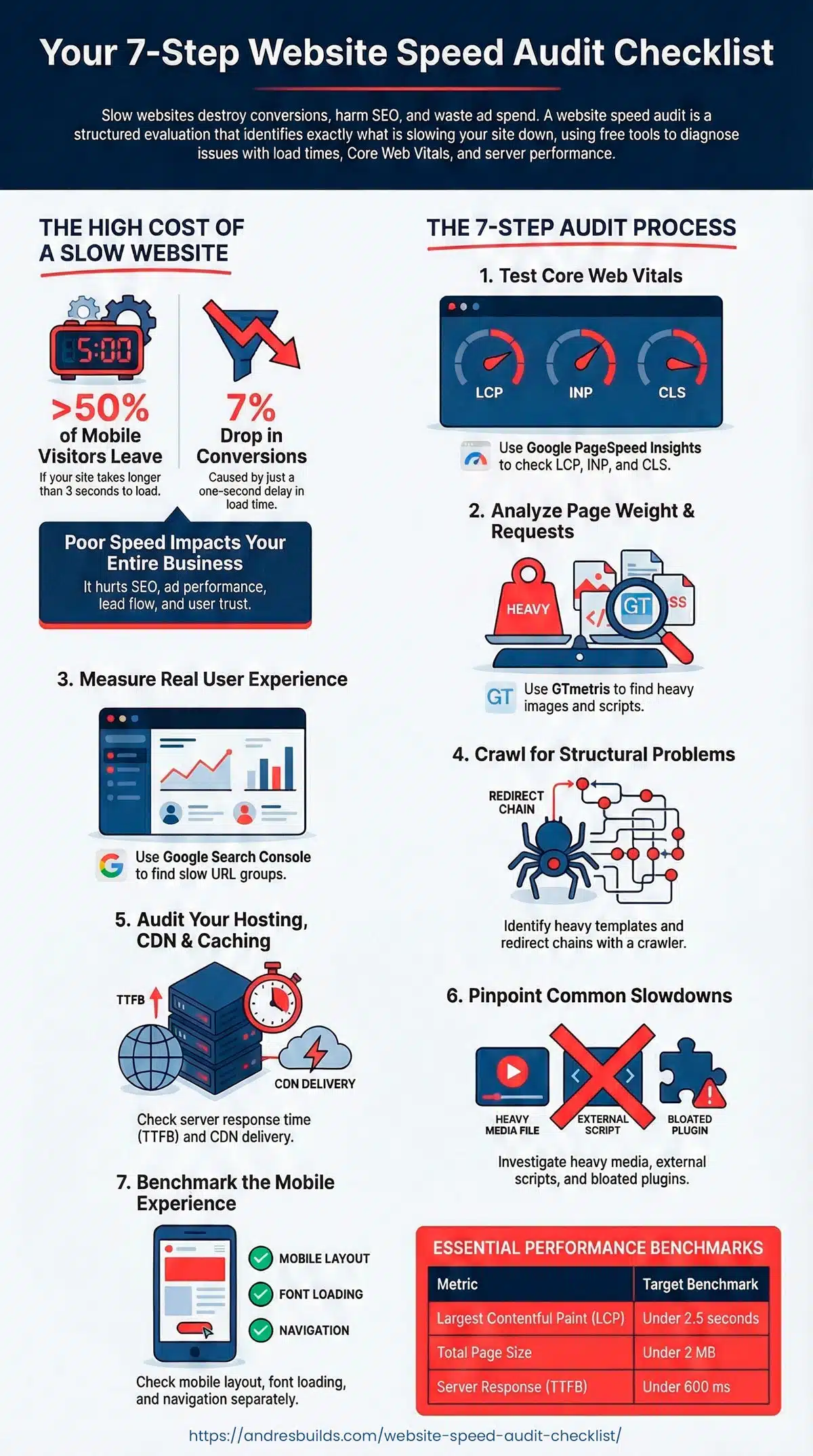

Slow websites do not just annoy people. They quietly destroy conversions, booking rates, ad performance, and trust. If your site feels heavy or loads unpredictably, you are losing money long before a visitor ever reads a single word on your page.
Research shows that more than half of mobile visitors leave if your site takes longer than 3 seconds to load. Another study found that even a one second delay can drop conversions by around seven percent.
The good news is that you can diagnose every major speed issue on your site using free tools and a clear, repeatable process. This guide gives you the exact website speed audit checklist I use when analyzing client websites before launching my Speed and Booking Fix service.
If you prefer the shortcut, you can request a free Speed and Booking Audit and I will send you a personalized breakdown with the fixes that matter the most.
Listen: Website Speed Audit Checklist: Step-by-Step Guide for Small Business Websites (Full Episode)
Key Takeaways
- Understand what a speed audit is and why it matters for conversions
- Learn how to run a complete audit using PageSpeed Insights, GTmetrix, Lighthouse, and GSC
- Get exact performance benchmarks your pages must hit
- Identify what is slowing down your pages
- Download a complete audit checklist to use monthly
- Know when to DIY and when to hire a professional
What Is a Website Speed Audit and Why It Matters
A website speed audit is a structured evaluation of how fast your site loads and how well it performs for real users. It is not the same as a general site health audit. A speed audit focuses on load times, render delays, Core Web Vitals, hosting performance, caching, and user experience.
Some people call this a website performance audit or a page speed audit. The wording varies, but the outcome is the same. You learn exactly what is slowing down your site.
Speed affects nearly everything:
- SEO
- Lead flow
- Conversion rates
- Booking completion
- Paid ad performance
If your site is slow, you are paying for traffic you will never convert.
For a deeper technical breakdown of what happens after an audit, read my WordPress Speed Optimization Guide.
The Tools You Need Before You Start
You only need free tools to run a complete audit:
- Google PageSpeed Insights
- Lighthouse
- GTmetrix
- Google Search Console
- WebPageTest
- A crawler like Screaming Frog
Step 1: Run a Core Web Vitals Test with PageSpeed Insights
This is the heart of your audit. PageSpeed Insights shows you the metrics Google cares about most.
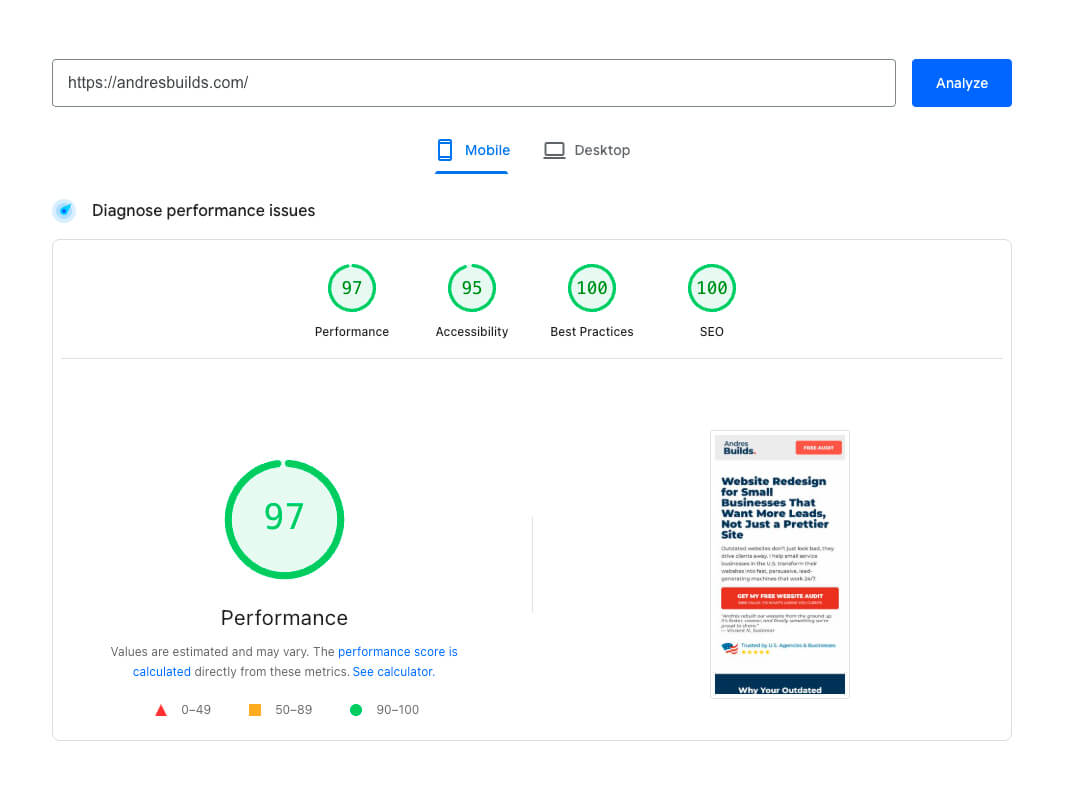
Metrics to Check
- Largest Contentful Paint
- Interaction to Next Paint
- Cumulative Layout Shift
- Mobile and desktop performance
Benchmarks
- LCP under 2.5 seconds
- INP under 200 milliseconds
- CLS under 0.1
- Mobile score ideally above 70
If you want to understand exactly how these scores affect SEO, read Google PageSpeed Insights Impact.
Step 2: Analyze Rendering, Requests, and Page Weight with GTmetrix
GTmetrix exposes performance problems hidden beneath the surface.
What GTmetrix Reveals
- Total page size
- Number of requests
- JavaScript weight
- Third party scripts
- Waterfall timing
- Slow server response
Red Flags
- Page size above 2 MB
- More than 80 requests
- Heavy hero images
- Multiple render blocking scripts
To learn how to fix speed problems quickly, see Fix WordPress Speed Issues Without Plugins.
Step 3: Measure Real World Experience with Google Search Console
GSC reveals how real users experience your site over time.
Check For
- Slow URL groups
- INP problem pages
- Mobile versus desktop gaps
Learn how Google collects field data in How to Measure Real World Website Speed Like Google.
Step 4: Crawl Your Website for Structural Problems
A slow site is rarely caused by a single page. Crawling helps you see patterns.
What to Identify
- Heavy templates
- Redirect chains
- Oversized images
- Problematic layout blocks
- Template based slow pages
Step 5: Audit Hosting, CDN, and Caching
Even perfect on-site optimization cannot fix poor hosting.
Check
- Server TTFB
- CDN delivery
- Cache headers
- PHP version
- Cloudflare settings
For a complete overview of what goes into a full optimization service, read Website Optimization Service Explained.
Step 6: Identify Elements That Kill Load Time
Most site slowdowns come from 3 things:
- Heavy media
- External scripts
- Poorly optimized plugins
If you want a quick walkthrough on what to fix without installing more plugins, see Fix WordPress Speed Issues Without Plugins.
Step 7: Benchmark the Mobile Experience Separately
Your mobile performance matters more than your desktop score.
Check
- Button spacing
- Layout shifts
- Font loading
- Navigation friction
- First impression rendering


Website Speed Audit Checklist
| Area | What to Check | Tool | Benchmark | Pass or Fail | Notes |
|---|---|---|---|---|---|
| Core Web Vitals | LCP, INP, CLS | PSI | LCP < 2.5 | ||
| Page Size | Total MB | GTmetrix | Under 2 MB | ||
| Requests | Total number | GTmetrix | Under 80 | ||
| Server Response | TTFB | GTmetrix or PSI | Under 600 ms | ||
| Image Optimization | Compression and format | PSI | WebP, compressed | ||
| Template Performance | Heavy layouts | Screaming Frog | Consistent load | ||
| Mobile UX | Layout and interaction | PSI Mobile | Passing CWV |
Download your Website Speed Audit Checklist template
When to DIY vs Hire a Professional
DIY if:
- Your site is small
- You understand basic optimization
- You are not running ads
Hire a professional if:
- You run ads
- You operate a booking dependent business
- You already optimized and are still slow
- You use heavy themes or builders
- You want guaranteed improvements
Frequently Asked Questions
How often should I run a website speed audit
At least once per quarter but ideally once a month, especially if you publish new content or add new plugins.
What is a good website speed for small businesses
Aim for LCP under 2.5 seconds, INP under 200 milliseconds, and a mobile PageSpeed score above 70.
What tools do I actually need
You can run a full audit with PageSpeed Insights, Lighthouse, GTmetrix, and Google Search Console.
How long does a full website speed audit take
Between 20 and 60 minutes depending on site size.
What is the difference between a speed audit and a performance audit
A speed audit focuses on load times and metrics. A performance audit evaluates the entire system including hosting, caching, and code level issues.
Final Thoughts
If you ran this entire audit, you are ahead of most business owners. You now know why your site is slow and what to fix next.
If you want me to analyze your site and show you the exact improvements that will increase conversions, request a free Speed and Booking Audit. I will send you a video breakdown and a clear action plan.